Frequently Asked Question
Storage: How do I enable file self-healing on DSM?
Last Updated 10 years ago
Since DSM 6.1, the system is able to detect silent data corruption and repair the corrupted files in general cases with the file self-healing feature.
The file self-healing feature is currently available for the shared folders located in a Btrfs volume which was created with one of the following RAID types:
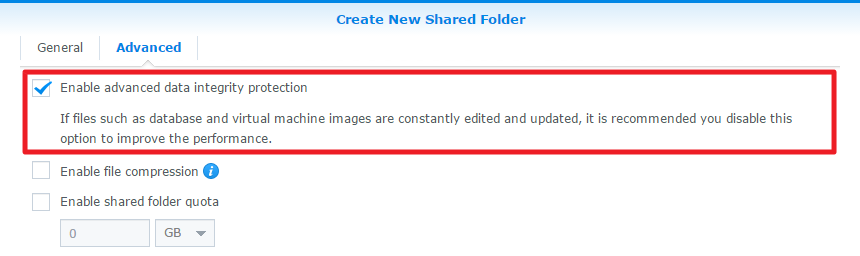
Once the creation of shared folder is complete, this option can no longer be altered. You can go to Control Panel > Shared Folder to check if, in the Advanced tab in the shared folder's edit window, the Enable advanced data integrity protection checkbox has already been ticked.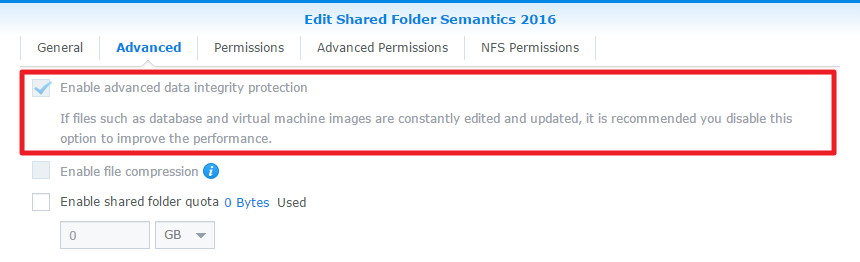
The file self-healing feature is currently available for the shared folders located in a Btrfs volume which was created with one of the following RAID types:
- RAID 1
- RAID 5
- RAID 6
- RAID 10
- Synology Hybrid RAID (SHR/SHR-2) with more than one drive
Note:
- The file self-healing feature is currently only available for the shared folders mentioned above. The files stored on file-level iSCSI LUNs created on a Btrfs volume will not be protected with this feature.
Limitations:
The file self-healing feature is not available in the following conditions:- during the repair or parity consistency check of a volume, disk group, or RAID group
- if SSD read-write cache is enabled
- if the volume is degraded
Once the creation of shared folder is complete, this option can no longer be altered. You can go to Control Panel > Shared Folder to check if, in the Advanced tab in the shared folder's edit window, the Enable advanced data integrity protection checkbox has already been ticked.
ZGTLv161108