
Frequently Asked Question
How do I access a Synology NAS remotely without exposing unnecessary services?
QUICK ANSWER
Choose remote access for the service you actually need. QuickConnect supports selected Synology applications; access to an ordinary SMB share should normally use an appropriately configured VPN.
Applies to: DSM external access, supported QuickConnect applications and private remote file access. Router/ISP and VPN capabilities vary.
Work through these checks
- Define the required access. Separate DSM administration, Drive/Photos/mobile apps and SMB file shares. A browser connection and a mapped network drive are different services.
- Confirm local access and updates. Verify the intended account and application work on the trusted LAN, use supported software and protect the account with the appropriate sign-in controls.
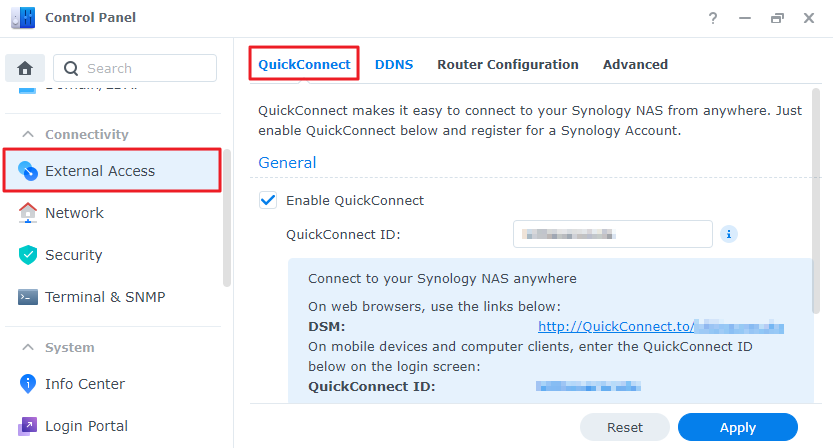
- Use QuickConnect for supported apps. On DSM7 layouts, review Control Panel > External Access > QuickConnect. Confirm the application is supported and test it from outside the home/office network.
- Use a supported VPN for SMB. For remote access to a shared folder, establish the authorised VPN and then connect to the NAS's internal address. Confirm routes, account permissions and any overlap with the remote location's subnet.
- Treat DDNS and forwarding separately. DDNS provides a name; it does not bypass CGNAT, create a VPN or prove that a service is securely reachable. If a specific inbound service is required, review its exact exposure and ISP constraints with the administrator.
- Test the real remote path. Use mobile data or another external network and verify the required action with the intended user. Record TLS/certificate or route errors rather than bypassing them.
Confirm the result
The required app or share works from an external network through the selected supported route, with unnecessary services still unavailable.
Before going further: Do not forward SMB ports directly to the internet, enable router DMZ or disable NAS/router firewalls broadly. Preserve a local recovery path before network changes.
If you need help
Include these details in your ticket: DSM/model, required app/protocol, remote-access method, ISP/CGNAT situation and exact error without credentials or public-address details unless needed.
Related guidance: Why is Synology QuickConnect slow when my local NAS connection is fast? · Why can I open UniFi remotely, but my NAS VPN or port-forwarded service fails behind CGNAT? · UniFi VPN connects on mobile data but cannot reach my NAS from hotel or home Wi-Fi. Why?
Updated 261111