
Frequently Asked Question
HD: How to setup Gmail for mail alert on HD cameras?
You may receive error message "Can't find smtp log file.Send mail timeout" "or" “Incorrect username "or" password” when using Gmail for Sender in Mail Settings. Please kindly follow the steps below to have a troubleshooting.
Step 1:
Please make sure you have input the correct settings for Gmail, take the bellow pictures for reference:
 Picture 1
 Picture 2
Note:
Please click on “Save” before “Test”.
If you have confirmed your mail settings are OK but the test result feedback failed, please try the steps below.
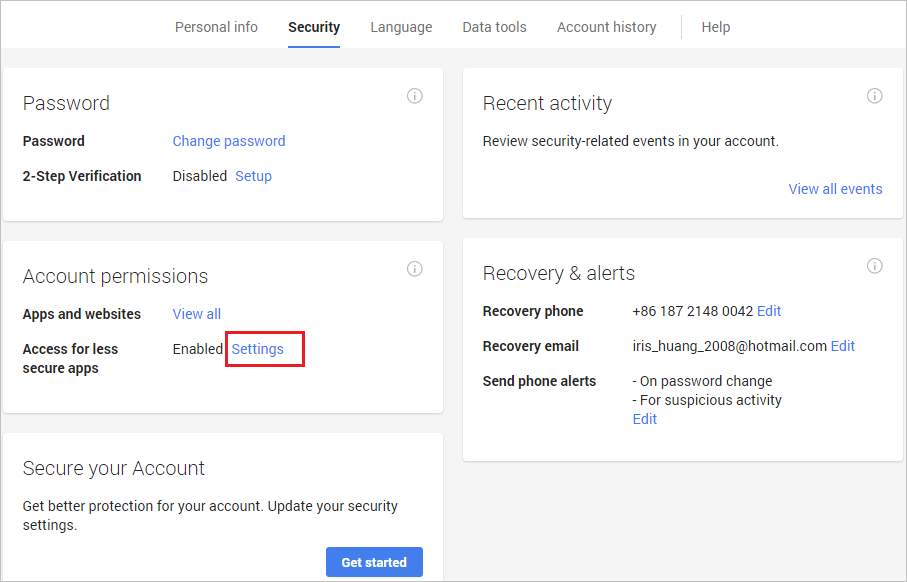
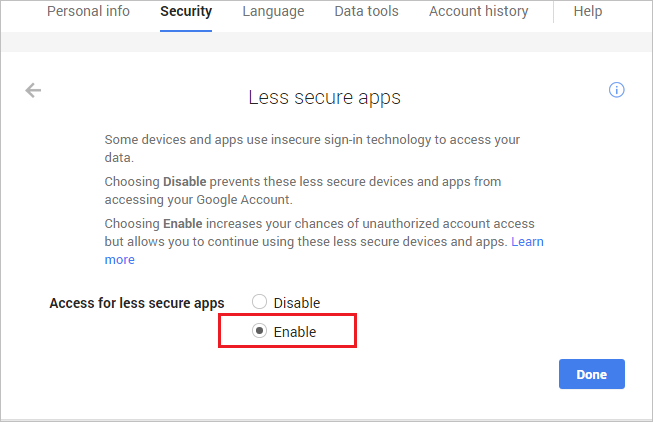
Step 2: Enable “Access for less secure app” in your gmail settings.
1. Go to the relevant support resource (ask our Support Specialist) and login your gmail account;
2. Click on “Settings” behind“Access for less secure apps”, then choose “Enable”.
Step 3:
Create a separate password for your camera.
Please refer below link below about the Application-specific password required
the relevant support resource (ask our Support Specialist)
Step 4:
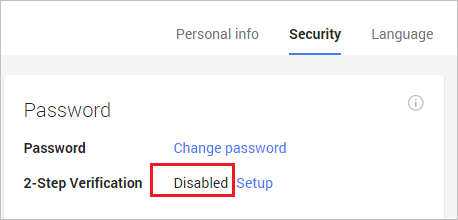
You can try to disable the 2-Step Verification temporarily.
1. Go to the relevant support resource (ask our Support Specialist) and login your gmail account;
2. Choose to “Disable” the 2-Step Verification.
End
Step 1:
Please make sure you have input the correct settings for Gmail, take the bellow pictures for reference:
Please click on “Save” before “Test”.
If you have confirmed your mail settings are OK but the test result feedback failed, please try the steps below.
Step 2: Enable “Access for less secure app” in your gmail settings.
1. Go to the relevant support resource (ask our Support Specialist) and login your gmail account;
2. Click on “Settings” behind“Access for less secure apps”, then choose “Enable”.
Step 3:
Create a separate password for your camera.
Please refer below link below about the Application-specific password required
the relevant support resource (ask our Support Specialist)
Step 4:
You can try to disable the 2-Step Verification temporarily.
1. Go to the relevant support resource (ask our Support Specialist) and login your gmail account;
2. Choose to “Disable” the 2-Step Verification.
End
Updated 151109