
Frequently Asked Question
General: How to install plugin for Mozilla Firefox?
For Firefox, it is a special way to install the plug-in, just open the Add-ons and pull the plug-in into the UI and it will install it.
1. Download the plug-in when you login your camera at the first time. Do the following step as picture 1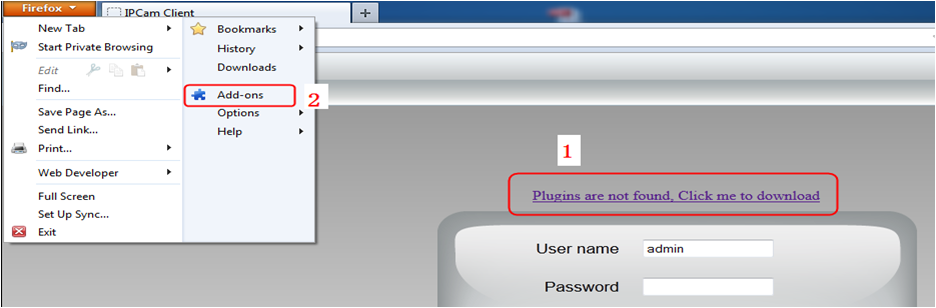
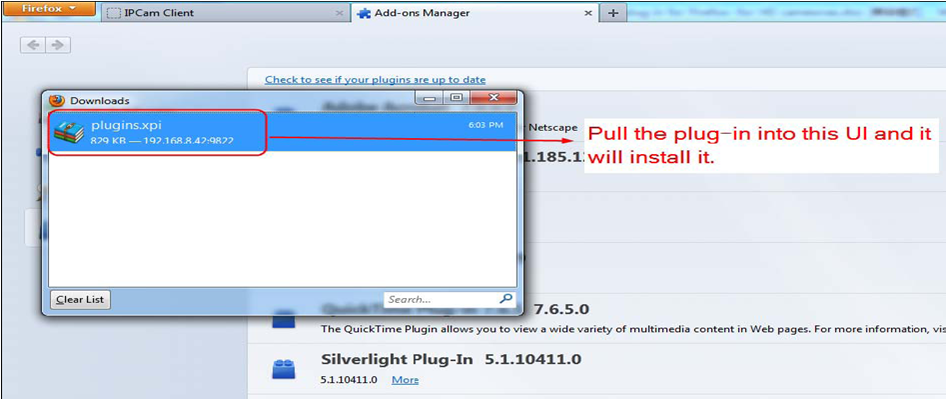
2. Pull the plug-in that you downloaded and drop to the Add-ons Manager UI that you have opened and the plug-in will install it.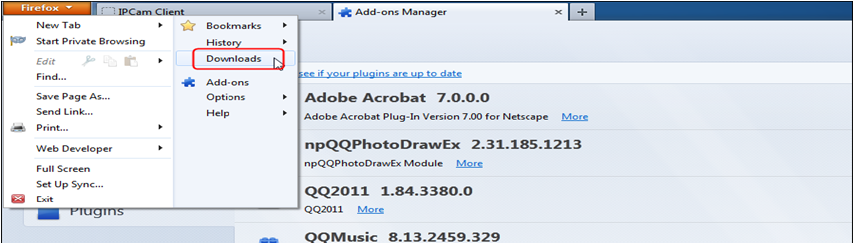
3. Choose “Install Now” as the following picture.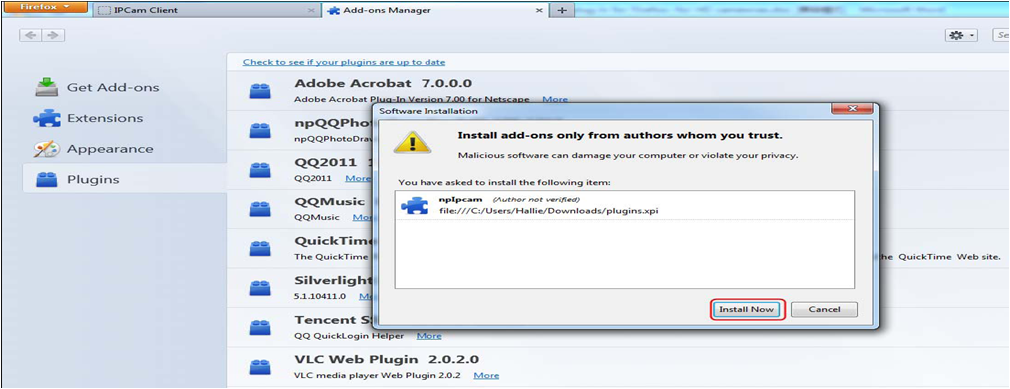
4. Please check if the plug-in was successfully installed or not. Restart browser to enable the plug-in.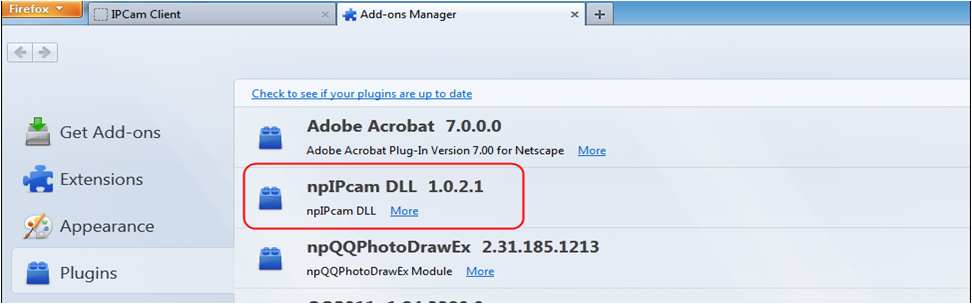
1. Download the plug-in when you login your camera at the first time. Do the following step as picture 1
2. Pull the plug-in that you downloaded and drop to the Add-ons Manager UI that you have opened and the plug-in will install it.
3. Choose “Install Now” as the following picture.
4. Please check if the plug-in was successfully installed or not. Restart browser to enable the plug-in.
Updated 160829
ACE Support
On this page
Share
Copy or share this guide.
Worth your time
- Set up a Foscam Wi-Fi camera with the app-generated QR code
- My Foscam camera shows the wrong time and recordings are hard to find. What should I check?
- How do I share a Foscam camera with family without giving them my account password?
- I can sign in to the Foscam app, but the camera says the username or password is wrong. Why?
- Why does my Foscam B4 live view stop after about five minutes, and can it record 24/7?
- My Foscam camera cannot recognise or format its microSD card. How can I check it?
- My Foscam camera looks clear by day but white or foggy at night. What should I check?
- Browser: What is the procedure to log into a HD camera via a web browser?
- App: How to add the camera on Foscam App in LAN (New)
- General: How to download recording on NVR to computer
- General: How to allow plugin run on my Firefox 52 for my Foscam camera or NVR?
- Client Software: How to set up the alarm recording on SD card on HD cameras?
- Client Software: How to add Foscam camera on Foscam NVR on Monitor?
- General: How to add Foscam camera in LAN on Foscam NVR on web browser?
- App: How to disable WiFi only option on the Foscam app?
- FosBaby: How to change your lullaby to a recognized format?
- FOSCAM's New Action: Six Product Series Introduction
- General: How to disable the voice prompt?
- HD: How to change the local record path on Mac OS X?
- HD: How can I get the alarm recordings on HD cameras?
- HD: How can I upload alarm images onto my FTP server?
- HD: How can I upload scheduled images onto my FTP server?
- HD: How to assign a static IP for your camera on Mac?
- HD: How to allow Foscam plug-in to run on Chrome?
- FosBaby: How to customized the lullaby in FosBaby?
- Storage: What size of HDD or portable disk that my Foscam NVR can support?
- App: How to add cameras to Foscam Viewer on iOS devices by scanning the QR code?
- MJ: How to make your camera more secure?
- HD: How to load the activeX in Windows7 Computer?
- MJ: How to set a static IP address For MJPG camera?
- HD: Why can’t I install the IP Camera tool in Mac?
- HD: Temporary solution for plugin can't work on Chrome?
- HD: How to upload the alarm images to SD card?
- HD: How to setup your firewall on HD cameras?
- Browser: How do I clear my web browser's cache, cookies, and history?
- HD: How can I get schedule recordings on HD cameras?
- HD: How to setup the IO Alarm settings?
- General: Check whether my Camera support RTSP / ONVIF?
- HD: How to setup remote access settings?
- HD: How to setup Gmail for mail alert on HD cameras?
- HD: How to set the IR LED schedule?
- HD: How to set a privacy zone for HD cameras?
- HD: How to playback the recordings in SD card?
- HD: How to monitor multi-devices in WAN for HD cameras?
- HD: How to make FTP work when FTP server connection failed pop up?
- HD: How to connect camera to WiFi by using WPS?
- HD: How to connect my HD camera to WiFi?
- HD: How can I get the alarm emails on HD cameras?
- Call Center: Foscam International Call Center Contact Information
- App: How to remove the association of the camera and the Foscam Account?
- Browser: Why my Chrome browser not able to load Foscam plugin?
- Browser: How to troubleshoot plugin compatibility issues in Window 10?
- HD: How to allow the plugin work in Safari for Mac?
- Storage: What size of microSD/SD card that my Foscam Camera can support?
- Client Software: How to connect camera to CMS in LAN?
- Client Software: How can I get alarm recordings for HD cameras on CMS?
- Client Software: How to connect camera to CMS in WAN?
- App: How to delete cameras from Foscam Viewer for Android?
- App: How to add cameras to Foscam Viewer on iOS devices manually?
- App: How to add cameras to Foscam Viewer on iOS devices in LAN?
- General: How to set up mobile viewing via Foscam Viewer?
- Browser: How to ensure plugin works with Google Chrome?
- General: How to perform a hard reset on the camera?
- HD: How to add camera’s IP address to Compatibility View Settings?
- General: Which outdoor model has the SD card slot?
- MJ: How to install Foscam Camera for Non-SD card model?
- MJ: How to add several cameras in WAN?
- MJ: How to monitor multi-device in WAN?
- General: What if I forgot user name and password of my camera, what I can do next?
- General: Why my IP Camera Tool cannot find the camera’s IP?
- General: What’s the normal status of camera when power on?
- MJ: How to set a static IP address for FI86xx series and FI9820W?
- HD: How to assign a static IP Address for HD camera?