
Frequently Asked Question
Browser: How to troubleshoot plugin compatibility issues in Window 10?
The Windows 10 had been released in July 29th, you might encounter some compatibility issue of plugin for browsers in Windows 10.
Edge in Windows 10 can't load any plugin, so Foscam camera can't work in Edge temporarily.
The Foscam R&D team is working on how to import the new Flash to it.
Chrome, Firefox and Internet Explorer are still available in Windows 10.
For the Google will drop support for the Netscape Plugin API (NPAPI).
The Foscam R&D team will finish import the new flash to Google Chrome in the end of the August.
Here's some tips for troubleshooting Windows 10 compatibility issue:
The troubleshooting for the plugin compatibility issue in Windows 10
As the default browser in Windows 10 can't load any plugin, we recommend you change the default browser to another browser in Windows 10.
the relevant support resource (ask our Support Specialist)
Some user might didn't know how to open the IE in Windows 10, please refer to the link below:
How to open Internet Explorer in Windows 10
the relevant support resource (ask our Support Specialist)
If you have the plugin issue for Firefox and IE for Windows 10, please try to reset the browser.
How to reset Internet Explorer settings
the relevant support resource (ask our Support Specialist)
Reset Firefox -fix most problems
the relevant support resource (ask our Support Specialist)
In Firefox, please ensure the Plugin is be allowed:
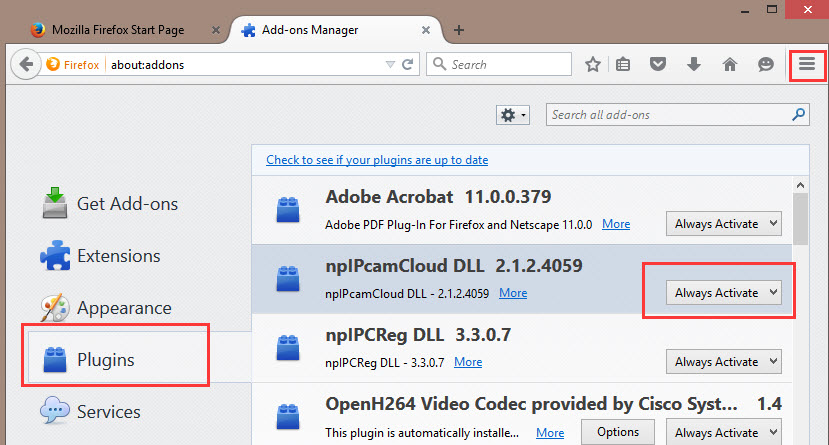
Please go to the "Settings", then choose "Add ons", then choose "Always Activate" for our plugin on the "Plugins" Tab.
In IE, please add the camera login page to the compatibility mode.
Fix site display problems with Compatibility View
the relevant support resource (ask our Support Specialist)
Edge in Windows 10 can't load any plugin, so Foscam camera can't work in Edge temporarily.
The Foscam R&D team is working on how to import the new Flash to it.
Chrome, Firefox and Internet Explorer are still available in Windows 10.
For the Google will drop support for the Netscape Plugin API (NPAPI).
The Foscam R&D team will finish import the new flash to Google Chrome in the end of the August.
Here's some tips for troubleshooting Windows 10 compatibility issue:
The troubleshooting for the plugin compatibility issue in Windows 10
As the default browser in Windows 10 can't load any plugin, we recommend you change the default browser to another browser in Windows 10.
the relevant support resource (ask our Support Specialist)
Some user might didn't know how to open the IE in Windows 10, please refer to the link below:
How to open Internet Explorer in Windows 10
the relevant support resource (ask our Support Specialist)
If you have the plugin issue for Firefox and IE for Windows 10, please try to reset the browser.
How to reset Internet Explorer settings
the relevant support resource (ask our Support Specialist)
Reset Firefox -fix most problems
the relevant support resource (ask our Support Specialist)
In Firefox, please ensure the Plugin is be allowed:
Please go to the "Settings", then choose "Add ons", then choose "Always Activate" for our plugin on the "Plugins" Tab.
In IE, please add the camera login page to the compatibility mode.
Fix site display problems with Compatibility View
the relevant support resource (ask our Support Specialist)
Updated 151109