
Frequently Asked Question
App: How to disable WiFi only option on the Foscam app?
When you are unable to view camera live video on Foscam app with mobile data, you need to disable WiFi only for live stream on Foscam app to fix the problem.
Below are the steps.
Step 1:
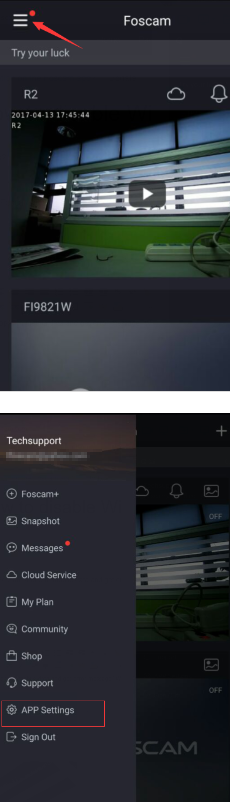
Log-in the Foscam app, tap the menu button at the top left corner, and then go to "APP settings".
Step 2:
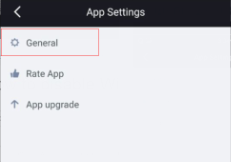
Select the "General" option.
Step 3:
Tap on ‘WiFi only for Live Stream’ option to turn it to gray color
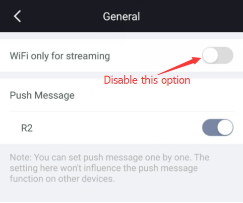
After finishing all 3 steps above, you will able to access the camera with mobile data.
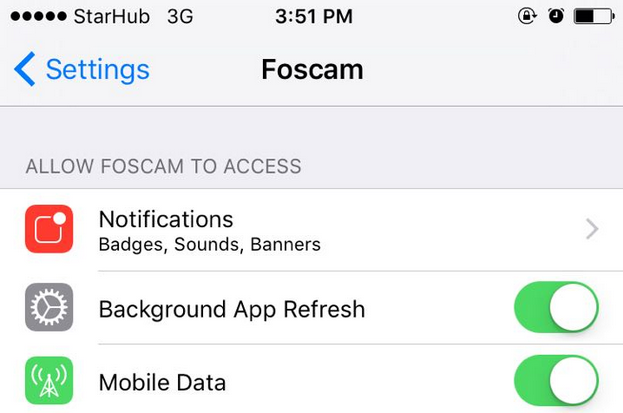
For IPhone -remember allow Foscam to Access at the setting there.
YPCv170526
Below are the steps.
Step 1:
Log-in the Foscam app, tap the menu button at the top left corner, and then go to "APP settings".
Step 2:
Select the "General" option.
Step 3:
Tap on ‘WiFi only for Live Stream’ option to turn it to gray color
After finishing all 3 steps above, you will able to access the camera with mobile data.
For IPhone -remember allow Foscam to Access at the setting there.
YPCv170526
Updated 170621
ACE Support
On this page
Share
Copy or share this guide.
Worth your time
- Set up a Foscam Wi-Fi camera with the app-generated QR code
- My Foscam camera shows the wrong time and recordings are hard to find. What should I check?
- How do I share a Foscam camera with family without giving them my account password?
- I can sign in to the Foscam app, but the camera says the username or password is wrong. Why?
- Why does my Foscam B4 live view stop after about five minutes, and can it record 24/7?
- My Foscam camera cannot recognise or format its microSD card. How can I check it?
- My Foscam camera looks clear by day but white or foggy at night. What should I check?
- Browser: What is the procedure to log into a HD camera via a web browser?
- App: How to add the camera on Foscam App in LAN (New)
- General: How to download recording on NVR to computer
- General: How to allow plugin run on my Firefox 52 for my Foscam camera or NVR?
- Client Software: How to set up the alarm recording on SD card on HD cameras?
- Client Software: How to add Foscam camera on Foscam NVR on Monitor?
- General: How to add Foscam camera in LAN on Foscam NVR on web browser?
- FosBaby: How to change your lullaby to a recognized format?
- FOSCAM's New Action: Six Product Series Introduction
- General: How to disable the voice prompt?
- HD: How to change the local record path on Mac OS X?
- HD: How can I get the alarm recordings on HD cameras?
- HD: How can I upload alarm images onto my FTP server?
- HD: How can I upload scheduled images onto my FTP server?
- HD: How to assign a static IP for your camera on Mac?
- HD: How to allow Foscam plug-in to run on Chrome?
- FosBaby: How to customized the lullaby in FosBaby?
- Storage: What size of HDD or portable disk that my Foscam NVR can support?
- App: How to add cameras to Foscam Viewer on iOS devices by scanning the QR code?
- MJ: How to make your camera more secure?
- HD: How to load the activeX in Windows7 Computer?
- MJ: How to set a static IP address For MJPG camera?
- HD: Why can’t I install the IP Camera tool in Mac?
- HD: Temporary solution for plugin can't work on Chrome?
- HD: How to upload the alarm images to SD card?
- HD: How to setup your firewall on HD cameras?
- Browser: How do I clear my web browser's cache, cookies, and history?
- HD: How can I get schedule recordings on HD cameras?
- HD: How to setup the IO Alarm settings?
- General: Check whether my Camera support RTSP / ONVIF?
- HD: How to setup remote access settings?
- HD: How to setup Gmail for mail alert on HD cameras?
- HD: How to set the IR LED schedule?
- HD: How to set a privacy zone for HD cameras?
- HD: How to playback the recordings in SD card?
- HD: How to monitor multi-devices in WAN for HD cameras?
- HD: How to make FTP work when FTP server connection failed pop up?
- HD: How to connect camera to WiFi by using WPS?
- HD: How to connect my HD camera to WiFi?
- HD: How can I get the alarm emails on HD cameras?
- Call Center: Foscam International Call Center Contact Information
- App: How to remove the association of the camera and the Foscam Account?
- Browser: Why my Chrome browser not able to load Foscam plugin?
- Browser: How to troubleshoot plugin compatibility issues in Window 10?
- HD: How to allow the plugin work in Safari for Mac?
- Storage: What size of microSD/SD card that my Foscam Camera can support?
- Client Software: How to connect camera to CMS in LAN?
- Client Software: How can I get alarm recordings for HD cameras on CMS?
- Client Software: How to connect camera to CMS in WAN?
- App: How to delete cameras from Foscam Viewer for Android?
- App: How to add cameras to Foscam Viewer on iOS devices manually?
- App: How to add cameras to Foscam Viewer on iOS devices in LAN?
- General: How to set up mobile viewing via Foscam Viewer?
- Browser: How to ensure plugin works with Google Chrome?
- General: How to perform a hard reset on the camera?
- HD: How to add camera’s IP address to Compatibility View Settings?
- General: Which outdoor model has the SD card slot?
- MJ: How to install Foscam Camera for Non-SD card model?
- MJ: How to add several cameras in WAN?
- MJ: How to monitor multi-device in WAN?
- General: What if I forgot user name and password of my camera, what I can do next?
- General: Why my IP Camera Tool cannot find the camera’s IP?
- General: What’s the normal status of camera when power on?
- MJ: How to set a static IP address for FI86xx series and FI9820W?
- HD: How to assign a static IP Address for HD camera?
- General: How to install plugin for Mozilla Firefox?