
Frequently Asked Question
File access: Mapping a Shared Folder to a Windows Computer
With Qfinder Pro, you can find all the available QNAP NAS devices on your network. You can map a NAS shared folder as a network drive so that you can quickly access and manage files from your Windows device.
Note:To download and install Qfinder Pro for Windows, go to the relevant support resource (ask our Support Specialist).
1. Open Qfinder Pro.
Qfinder Pro displays all QNAP NAS devices connected to the local area network.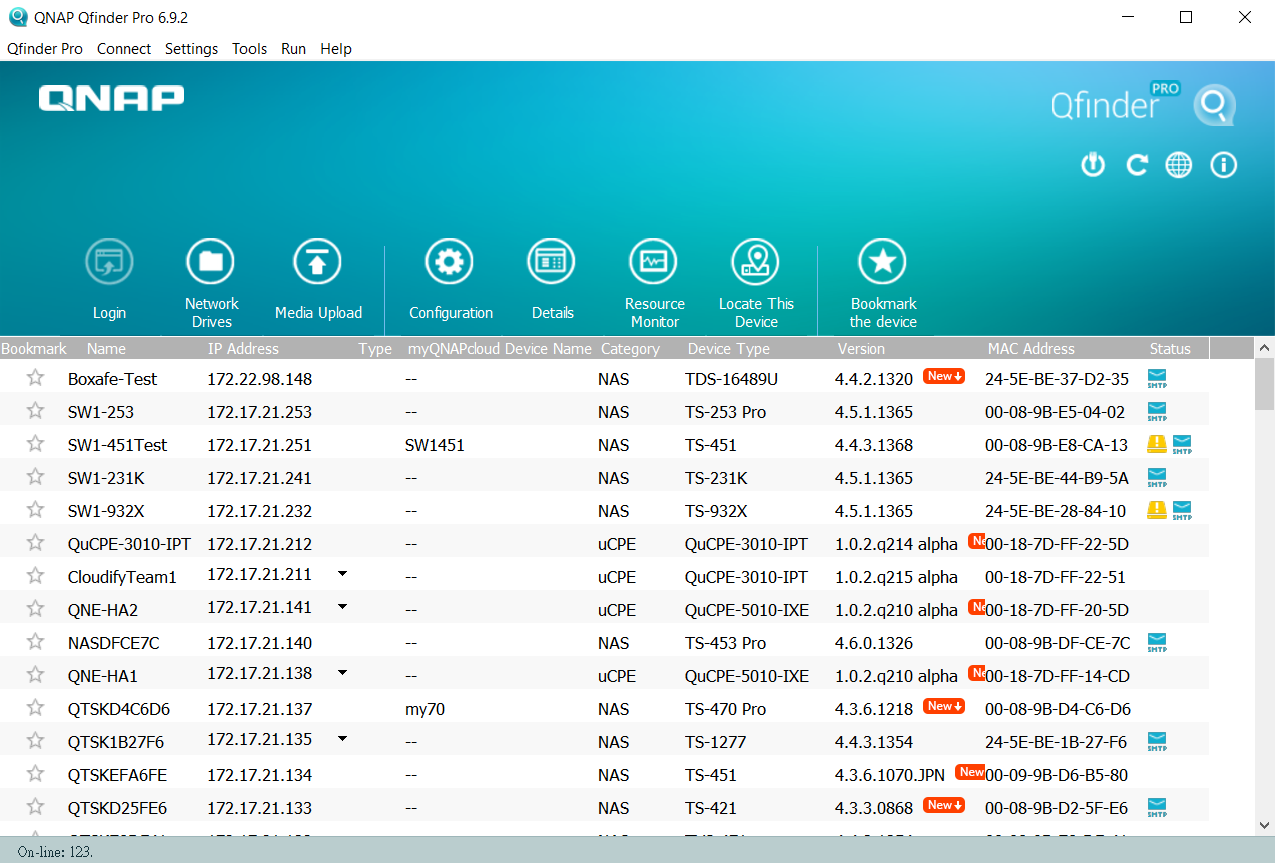
2. Select the NAS and then go to Tools > Map Network Drive.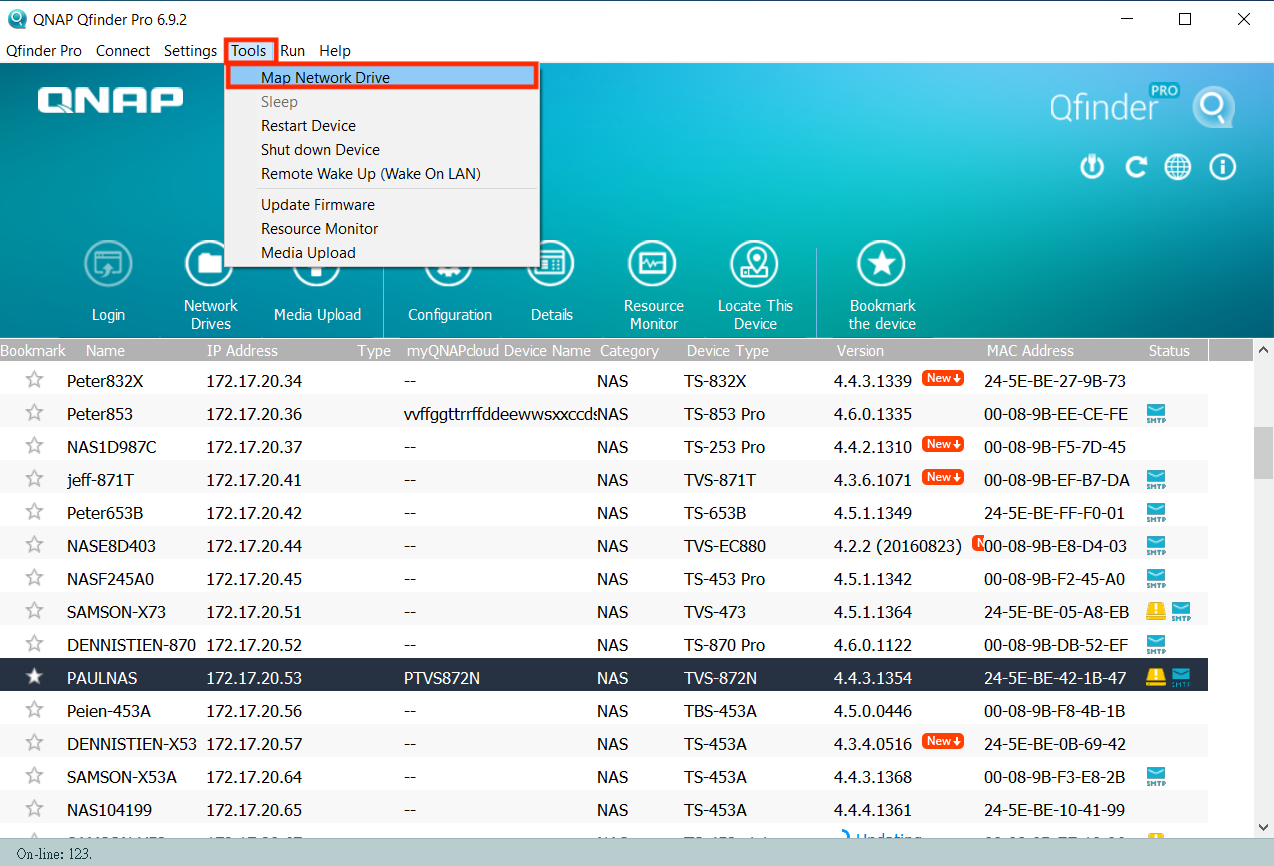
3. Select a shared folder and then click Map Network Drive.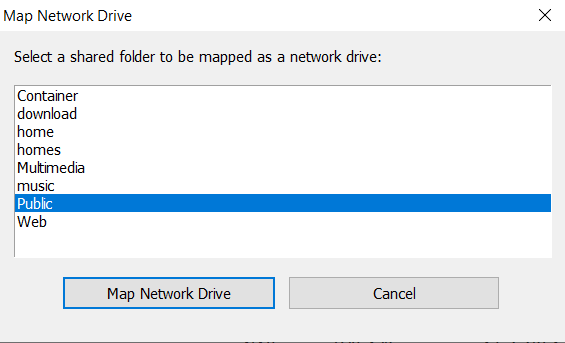
4. Type your NAS user name and password.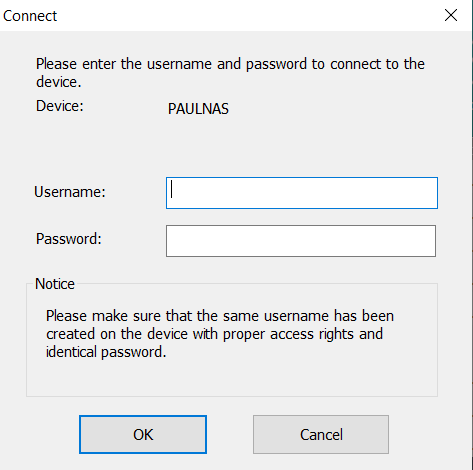
5. Specify a drive letter for the shared folder.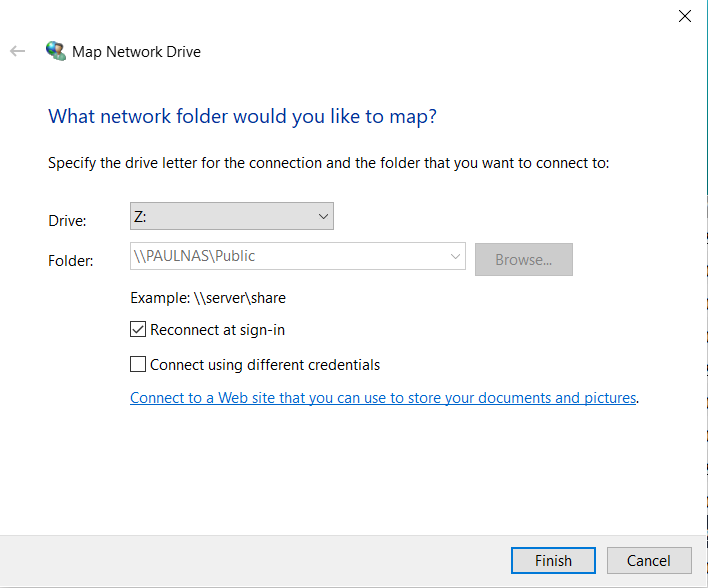
6. Click Finish.
The shared folder is mapped as a network drive and can be accessed using Windows Explorer.
Note:To download and install Qfinder Pro for Windows, go to the relevant support resource (ask our Support Specialist).
1. Open Qfinder Pro.
Qfinder Pro displays all QNAP NAS devices connected to the local area network.
2. Select the NAS and then go to Tools > Map Network Drive.
3. Select a shared folder and then click Map Network Drive.
4. Type your NAS user name and password.
5. Specify a drive letter for the shared folder.
6. Click Finish.
The shared folder is mapped as a network drive and can be accessed using Windows Explorer.
Updated 190731
On this page
Share
Copy or share this guide.
Worth your time
- How do I set up a supported QNAP QVPN server and verify remote access?
- QNAP App Center reports an invalid or expired digital signature. Should I allow the installation?
- Qfinder Pro cannot find my QNAP NAS. How do I discover or add it safely?
- Windows 11 says “Check the spelling of the name” for my QNAP share, but older PCs still connect. What should I check?
- QuMagie shows my photos but no new People matches. How do I check face recognition?
- Can I change the client-side encryption password on an existing HBS 3 backup job?
- QNAP NetBak Replicator for Windows: How do I back up, restore and distinguish HDP PC Agent?
- How do I set up Qsync on a Mac and verify the correct folders are synchronising?
- QNAP NAS password: change a user password or recover admin access
- Singapore ISP DNS servers: Singtel, StarHub, M1 and ViewQwest
- QuTS hero disabled an app to free system memory. Does this mean the RAM has failed?
- My encrypted QNAP volume is locked after a restart. Will resetting the admin password unlock it?
- How do I reconnect HBS 3 to an existing backup after replacing or resetting a QNAP NAS?
- HBS 3 connects to the remote QNAP but an RTRR backup never finishes. What should I check?
- Why does Qfile Pro stop uploading photos when my phone locks or the app is in the background?
- Time Machine says the QNAP backup is already in use. Should I delete the sparsebundle?
- Container Station says a port is already in use. Which port should I change?
- A QNAP container runs until I map its data folder, then shows Permission denied. Why?
- My QNAP works on the LAN but cannot reach the internet or cloud backup. Is the default gateway wrong?
- My QNAP volume is Read/Delete even though it shows free space. What should I check?
- QNAP reports RAID Group Not Active. Should I replace a disk or initialise the NAS?
- Can I move all my old QNAP drives into a newer NAS and keep the data?
- Why can Qsirch not find a new file that I can open on the NAS?
- How do I regain local NAS access when QuFirewall blocks my computer?
- Why are photos or videos missing from QuMagie even though they exist in File Station?
- Why is the web shortcut missing after migrating a container to Container Station 3?
- Why is my existing QVR Pro or QVR Elite licence not appearing in QVR Surveillance?
- Why does QVR Pro stop recording when storage is full after an unexpected shutdown?
- Why does QVPN Client connect but show Limited access or no NAS applications?
- Why is my HBS 3 backup a .qdff folder when QuDedup is disabled, and how do I restore it?
- Why does Dropbox authorisation fail in HBS 3 even after trying another browser?
- Why does Qsync skip particular files even though other files synchronise?
- Why Your NAS Doesn't Power On or Boot?
- Swapping Hard Drive Bay Placement in QNAP NAS
- General: What Is The Port Number Used By QNAP NAS?
- System Setting : System Log
- System Setting : Security
- Quickbook: Not Able to Access the Q Drive (Quickbook Database)
- File Access: How to Use OCR Converter to Recognize and Extract Text from Images?
- Virtualization Station: How to access QNAP Virtual Machine using Remote Desktop Connection
- Backup: How to use Hybrid Backup Sync to backup/restore/synchronize your files on a QNAP NAS
- Guide: QNAP Administrator Training
- Network & Security: How to use myQNAPcloud (QID) to remotely manage a NAS?
- General: How to retrieve QNAP System Log?
- Guide : QNAP NAS Workshop
- Backup: Creating an External Backup Job
- General: Why does my NAS system log report that the “File system is not clean”?
- Network: How to set up and use QVPN 2.0 ?
- Storage: How to Expand Capacity by Adding a Drive?
- Storage: How to Change the RAID type of a RAID group?
- General: How do I reset the administrator password of my NAS?
- QNAP: How Do You Set Up a Secure Volume with Encryption?
- Management: How to use push service?
- Network: How to configure to static IP address?
- Multimedia: How to manage videos with Video Station?
- Multimedia: How do I install Twonky in Ubuntu using Linux Station?
- General: How to reset your QNAP NAS?
- Multimedia: How to install Ubuntu on Linux Station and launch software in Ubuntu Software Center?
- Network: Set up OpenVPN on Windows
- Network: Set up OpenVPN on Mac
- General: Not able to access to QNAP Turbo NAS
- Storage: Hot-swapping the hard drives when the RAID degraded
- Miscellaneous: How to use the Helpdesk app to solve issues and provide feedback
- File Access: How do I use Qsync to backup my PC folder? (For Windows users)
- Storage: QNAP Turbo NAS Choose a RAID Type
- Virtualization Station: Virtual OS with USB support for CardPresso Dongle, HiTi and Zebra Card Printer.
- Application: How to use Container Station?
- Application: How to submit Support Request to QNAP?
- Virtualization Station: How to use Virtualization Station?
- General: QNAP NAS Installation
- Backup: Create, manage and revert to snapshots on QNAP Turbo NAS
- General: Rack Kit Installation Guide for 1U NAS Servers
- File Sharing: Why my File Station’s “Show files and folders of my PC” does not work?
- General: How to retrieve QNAP Diagnostic Log?
- Network: Does my NAS support QNAP Network & Virtual Switch?
- General: How to fix if my Windows cannot access NAS shared folder?
- File Access: How to use File Station to manage files on a QNAP NAS?
- Virtualization Station: Networking modes of Virtualization Station
- Storage: How to increase QNAP Storage Raid rebuild speed?
- Storage: QNAP Storage Performance Best Practice
- Multimedia: How to transcode videos to formats suitable for other devices?
- General: QNAP SSD Cache White Paper
- Backup: How to Configure Time Machine Back Up - Mac?
- Multimedia Management couldn't add in new folder path as "Media Folder"
- Security: How to enhance account security using 2-step verification?
- General: Accessing your QNAP NAS with myQNAPcloud Service
- Multimedia: Which video formats support hardware acceleration?
- File Access: How do I use Qsync to synchronize files on my computers and NAS? (For Windows users)
- General: NAS User Manual
- Surveillance Station 5.0: How many camera licenses / free channels do my NAS have?
- Virtualization Station: Modify and Change Remote Desktop Listening Port
- Storage: Which models can support SSD caching and how much memory is needed?
- General: Does TS-x51/x53's HDMI output support HDMI 1.4 for 4K TV?
- Multimedia: Why does it say ''VLC media player is not installed'' when I play the video in Google Chrome?
- Web Server & Applications: How do I reset or change a root password for MySQL?
- Surveillance Station 5.0: How to add your camera which is not listed in the selection?
- Storage: How to create and use the iSCSI target service on a QNAP Turbo NAS?
- Storage: How to re-build multiple volumes to use snapshots after upgrading to QTS 4.2.0?